Fast Wi-Fi.
Connect instantly.
Welcome home to your always-on fiber internet service—no install, no waiting.
Get blazing-fast speed with reliability and security, plus unlimited data. Quantum Fiber from AT&T has pre-installed Wi-Fi equipment needed in your home, which allows you to get online in minutes.
Simply shop our plans, choose your speed, and sign up. Then, customize your online life with the Quantum Fiber app!

All plans include unlimited data on a 99.9% reliable* network and no annual contract.
*Based on network uptime or availability.

- Up to 500 Mbps download and upload speeds
- Made for streaming multiple shows, making video calls, working from home, and more.
Limited availability. Service in select locations only.
Offer Details
- Up to 1 Gig download and upload speeds
- Designed for HD streaming, marathon gaming, and a houseful of connected devices.
Limited availability. Service and speed in select locations only.
Offer Details
- Up to 8 Gig download and upload speeds
- Engineered for massive data sharing, fanatical gaming, and large-file video editing.
Limited availability. Service and speed in select locations only.
Offer DetailsWhy Quantum Fiber?
Advanced security

- Built-in intelligent cybersecurity helps guard everyone on your Wi-Fi.
- Our network proactively detects threats to help protect your privacy and data from malicious attacks.
Customized control

- The app gives you the control to create customized profiles, device access and scheduling, filter content, and more.
Smart and seamless Wi-Fi

- The Wi-Fi blankets your space with a strong signal to help keep your devices connected at the best speeds possible and adapts to your devices' needs.
Ultra-fast unlimited data

- Get fast upload and download symmetrical speeds and unlimited data.
- Up to 1 Gig or even up to 8 Gig.
Limited availability. Service and speed in select locations only.
Reliable day and night

- Gigspeed internet options available to keep you connected all day and all night on a network with 99.9% reliability*.
*Based on network uptime or availability.
Instant and easy

- Instant—no waiting for equipment or need to install.
- Easy—no annual contract, no credit check, just prepay month-to-month.
How to set up Quantum Fiber in your home.

Step 1: View prices and speeds
- Click on Shop Plans above and enter your home address to view pricing and speeds available in your home.
Step 2: How to connect
- Set up your account: Once you’ve signed up for your service, follow the instructions found in your Welcome Email from Quantum Fiber.
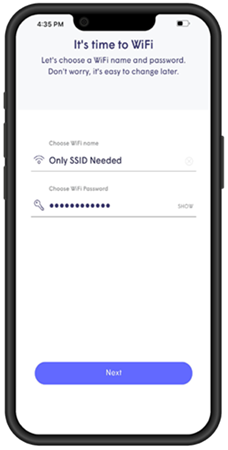
- Connect your devices: After you’ve moved in, you’ll need the Quantum Fiber App to create your Wi-Fi name (Network SSID) and password.
Note: Some directions may reference centurylink.com/on; this equipment will work with Quantum Fiber.
How the app works.
Easily manage your account and your Wi-Fi network with the Quantum Fiber app.
You’re in control of your Wi-Fi network.
- Choose your network SSID and password.
- Set parental controls.
- Block content, ads, or outside devices.
- Monitor Wi-Fi and device coverage.
Please go to the Support section to see important changes or find self-help tips.
Need assistance?
We're happy to help.

Frequently asked questions
No, Quantum Fiber and your community have partnered to provide you with pre-installed Wi-Fi equipment available to use in your home.
Click on Shop Plans to see special pricing at your community.
Quantum Fiber is a monthly subscription for internet service that automatically renews each month on the same calendar day. Quantum Fiber internet is governed by the Quantum Fiber Internet Subscriber Agreement, posted at quantumfiber.com/legal.
Go to the How to Connect page for directions on how to connect.
After you have ordered service, set up your account password by following the instructions in your Welcome Email.
- If you don’t see your Welcome Email click on the chat bubble to request your Welcome Email to be resent.
Note: You can manage your account online, 24/7. Go to Sign In. Then log in with your email address and account password.